Docs · Guide
Get started
packinggoods is one place to choose the model each of your agents uses. Add the providers you have, then pick a model per agent; packinggoods writes it into that agent’s own config.
Behind it is a small gateway on your machine, at 127.0.0.1:3425. It speaks the OpenAI, Anthropic and Gemini APIs and translates between them, streaming and tool calls included, so any agent can use any provider’s models: Claude Code on a GPT model from your ChatGPT plan, Codex on DeepSeek, OpenCode on your Claude plan.
Providers
Where models come from: subscriptions you sign in to, vendors you have an API key for, and your own endpoints. Each model is named provider/model.
Agents
The tools that use them: Claude Code, Codex, Gemini CLI, OpenCode and the rest. One row each, with the model it is set to.
Gateway
The local endpoint every agent is pointed at when you pick a model through packinggoods. It sends each request to whoever serves that model.
Routing groups
Optional. Several models or accounts an agent picks as one, group/<id>, for when one runs out of quota.
- Add providersSign in to your subscriptions, paste API keys. Once is enough.
- Pick a model for each agentClick the agent’s model, choose one. packinggoods rewrites that agent’s config.
- Start a new sessionAgents read their config when they start; the next session uses the new model.
1 · Add your providers
Open the Providers tab and press + Add provider. Pick a tile, or type a vendor’s name to find it.
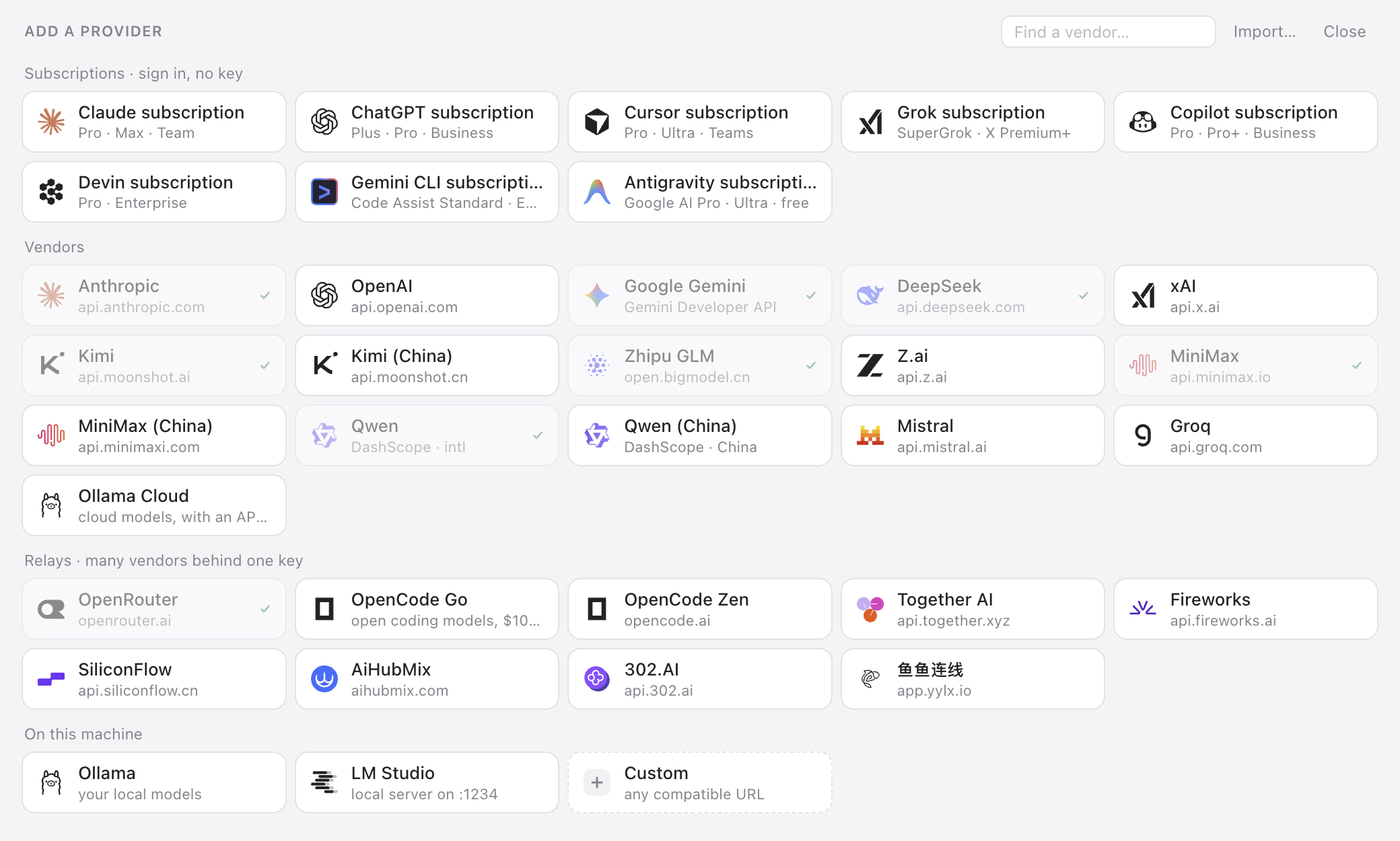
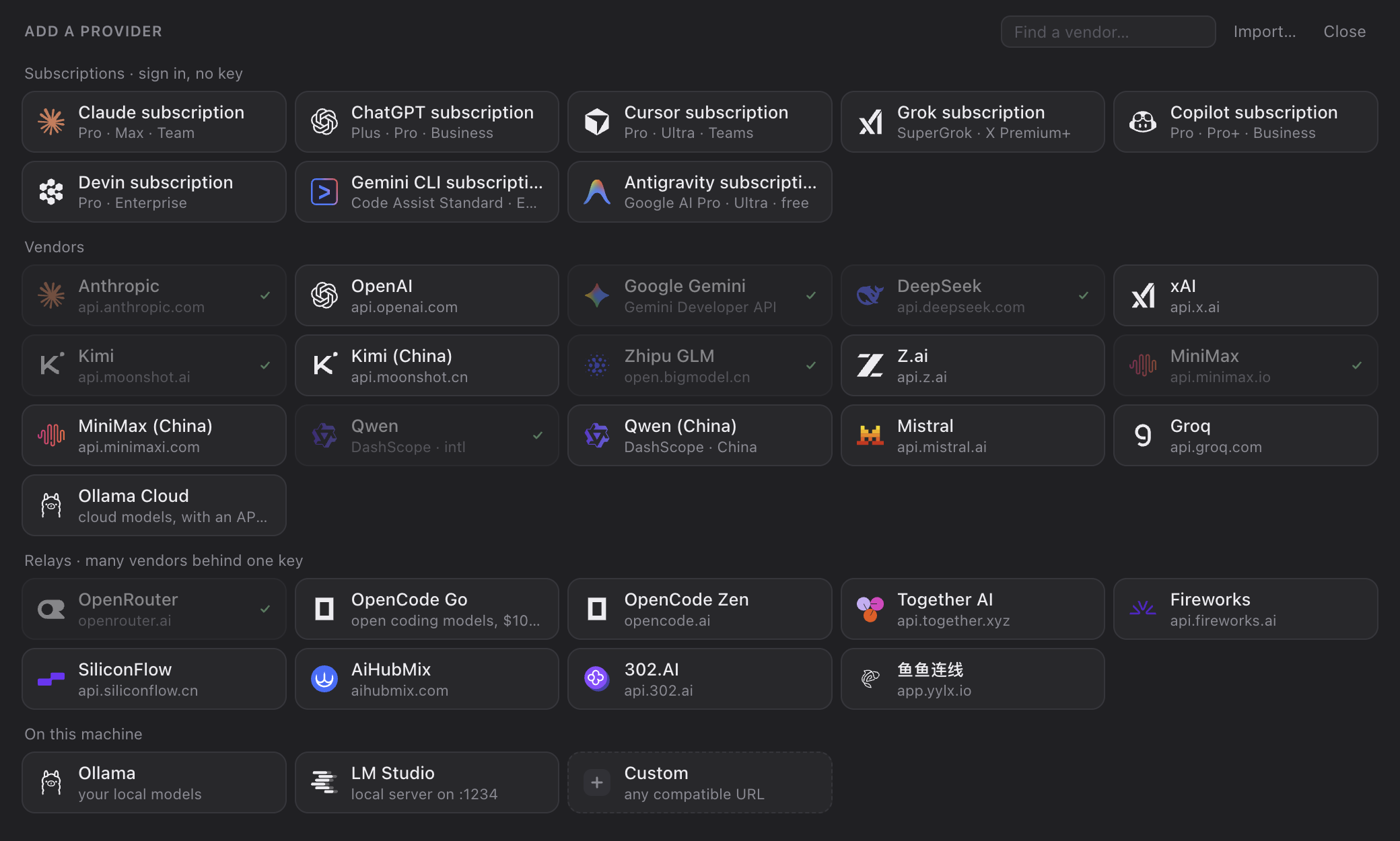
Subscriptions · sign in, no key
Claude (Pro, Max, Team), ChatGPT (Plus, Pro, Business), Copilot, Gemini (Code Assist) and Antigravity; Cursor, Grok (SuperGrok), Devin and others are added from the Plugins page. Click the tile and packinggoods opens the vendor’s own sign-in page in your browser; the account shows up as soon as you finish (Copilot gives you a code to enter on GitHub’s page). Subscriptions are added here, in packinggoods, not by logging in inside another agent.
- More than one account. Click the Claude or ChatGPT tile again to add another; each is listed under the provider, one click from being the one in use.
- Already signed in? An agent you are signed in to on this machine shows up as a provider too, signed in as ….
- Every agent can use it. A subscription’s models are
claude/…,codex/…,copilot/…,antigravity/…in every other agent’s picker: to run Antigravity’s Claude or Gemini models in Codex or Claude Code, sign in to Antigravity here and pick anantigravity/…model on the agent’s row. Nothing else to set up. Google may suspend an Antigravity account it sees used outside Antigravity, so use one you can afford to lose. Claude subscription requests run through the Claude Code installed on this machine, so keep it installed.
Vendors
Anthropic, OpenAI, Google Gemini, DeepSeek, Kimi, Zhipu GLM, MiniMax, Qwen, Mistral, Groq, xAI and more. Pick one, paste the key (Get a key ↗ links to the vendor’s key page), save. packinggoods asks the vendor which models it serves and offers those; open the provider’s row to choose which ones agents see, or Test it.
On this machine
Ollama and LM Studio. No key.
Custom · any compatible URL
For anything else: a Name, an OpenAI compatible base URL (ending in /v1), an Anthropic compatible one (the root, what ANTHROPIC_BASE_URL would take), or both, and the key. Give every API the endpoint speaks; each agent uses the one it speaks natively and packinggoods translates for the rest.
settings.json and Codex’s config.toml, changes nothing in them, and brings over the providers you tick.Keys live in ~/.config/packinggoods/providers.json, readable by you alone. packinggoods never reads keys from your shell environment: what you add is what it uses.
2 · Pick a model for each agent
The Agents tab has a row for each agent installed or configured on this machine. packinggoods knows Claude Code, Codex, Gemini CLI, OpenCode, MiMo Code, DevEco Code, Pi, Goose, Cursor CLI, Copilot CLI, Crush, DeepSeek Harness, Command Code, omp, OmO, Devin, Hermes Agent, MiniMax Code, Grok Build, ZCode, OpenHanako and Alma.
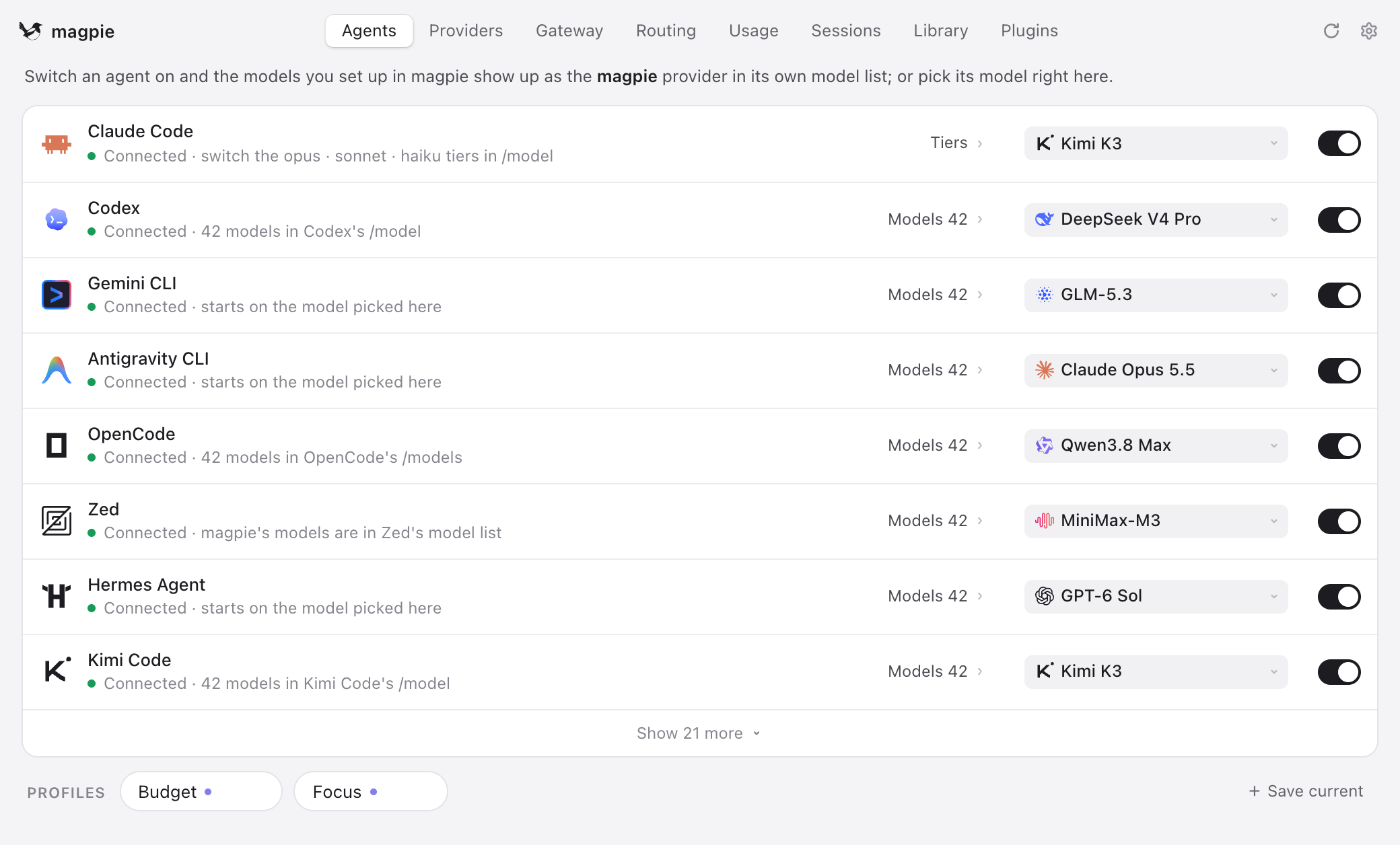
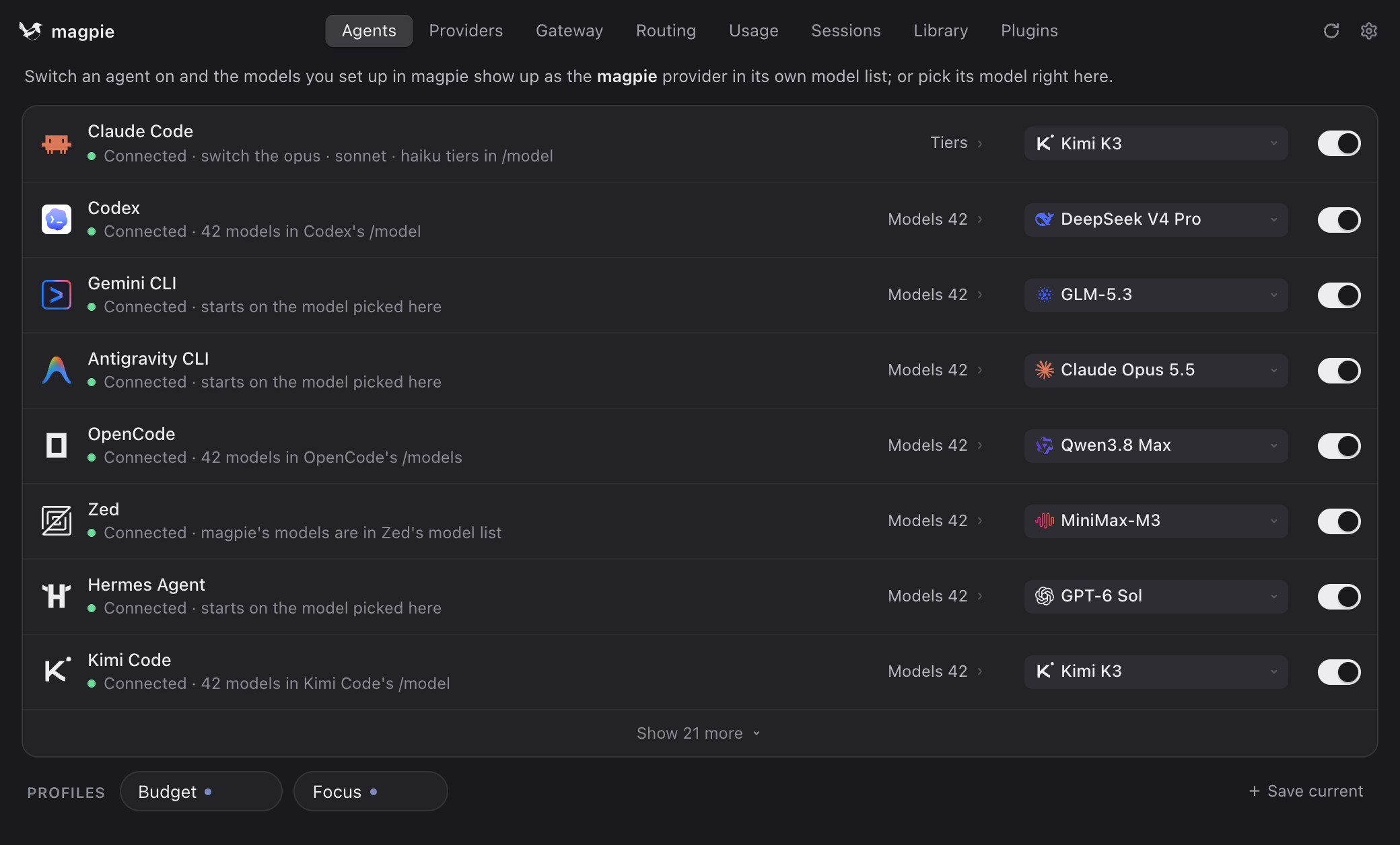
- Click the model to open the picker. Models are grouped: the agent’s own, your routing groups, then each provider you added. Type to filter, or type any model id that is not listed.
- Reasoning effort, where the agent has it (Codex’s effort, Pi’s thinking), is a slider under the list.
- Fast mode. A model with a fast mode has a bolt on its row, beside its star; it shows on the picked row and under the pointer. That is a GPT model of a ChatGPT (Codex) account, a GPT or o-series model on an OpenAI key, Cursor’s models with a fast variant, Claude Opus on an Anthropic key, and a plugin’s or another packinggoods’s model that says it is served at priority. Click it, and every request this agent sends that model goes in its vendor’s fast mode, quicker at a higher price:
service_tier: "priority", as Codex’s own/fastsends it, or Claude’sspeed: "fast", whatever API the agent speaks. Click again for Ultrafast, where a ChatGPT account offers it on the model, and again for the usual speed. Each agent is switched apart, and the model’s fallbacks go as they are. In a routing group, each member has the same switch in its row. - Claude Code through packinggoods can also give its opus, sonnet and haiku tiers models of their own; by default they follow the main model.
Picking a model writes it into the agent’s own config file. Only the keys packinggoods needs change; comments, ordering and indentation survive, and writes are atomic.
| Agent | What a model through packinggoods writes |
|---|---|
| Claude Code | ~/.claude/settings.json: ANTHROPIC_BASE_URL, ANTHROPIC_AUTH_TOKEN and the model variables in its env block |
| Codex | ~/.codex/config.toml: a [model_providers.pkgood] table and the model, with the list in packinggoods-models.json. Your ChatGPT sign-in is left alone |
| OpenCode, MiMo Code, DevEco Code, Pi, Crush | A packinggoods provider entry, and packinggoods/provider/model |
| Open Code Review | ~/.opencodereview/config.json: a packinggoods custom provider, made the one ocr uses |
| AtomCode | ~/.atomcode/config.toml: a packinggoods provider account and one model entry per catalog model |
| Snow CLI | ~/.snow/profiles/packinggoods.json: a packinggoods profile, made the active one (Snow App takes it in with "Sync Snow CLI API config") |
| QwenPaw | A packinggoods provider in ~/.qwenpaw.secret/providers/custom/packinggoods.json, and each agent's active_model in its agent.json. Restart QwenPaw after the first connect |
| Gemini CLI | GOOGLE_GEMINI_BASE_URL pointed at the gateway, API-key auth, and the model |
A running session keeps the model it started with. Agents read their config when they start, so the change applies to the next session. Codex builds its model list at start-up too: restart the Codex app and open codex sessions after a switch.
~/.claude or ~/.codex config. Set the model once in packinggoods and they get it too, from their next session.claude-packinggoods: Claude Code through packinggoods, claude left as it is. To keep a plain claude on your own Claude account and start packinggoods's Claude Code only when you ask for it, leave Claude Code unconnected and run claude-packinggoods instead. It starts the same claude with packinggoods's settings over yours for that session (the gateway, the model and its tiers), so ~/.claude/settings.json is never rewritten. Every argument goes to Claude Code: claude-packinggoods --resume, claude-packinggoods -p "…". packinggoods puts it beside the packinggoods command when you add that in Settings › Command line; with the command there already, run packinggoods claude launcher add once. packinggoods claude run does the same. A model you pick with /model in it is kept for the next claude-packinggoods, and your own claude keeps its model. packinggoods has to be running.3 · Optional: routing groups
With one account per provider you can skip this. It matters once you have several: two ChatGPT accounts, or the same model from a subscription and from a key.
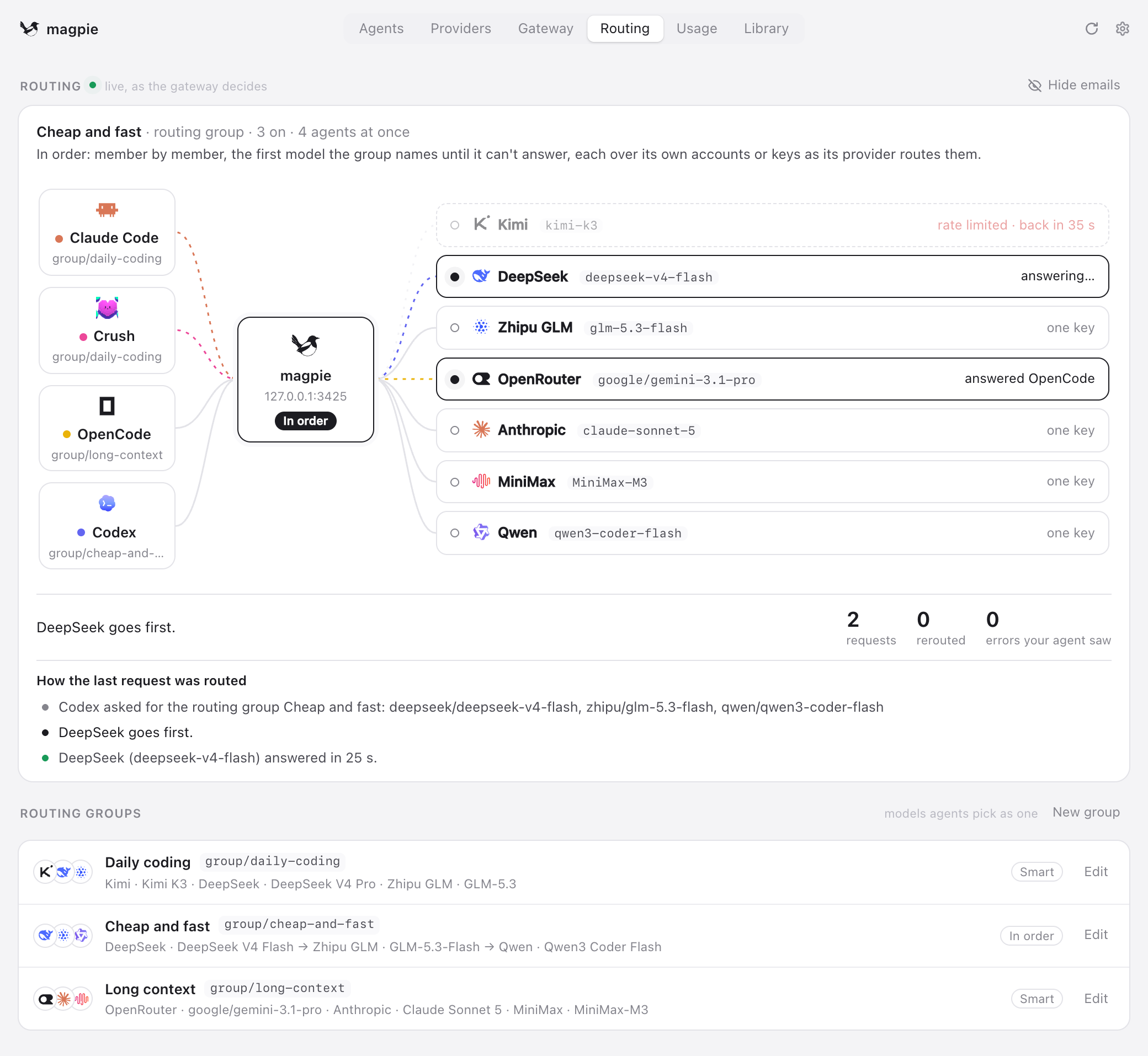
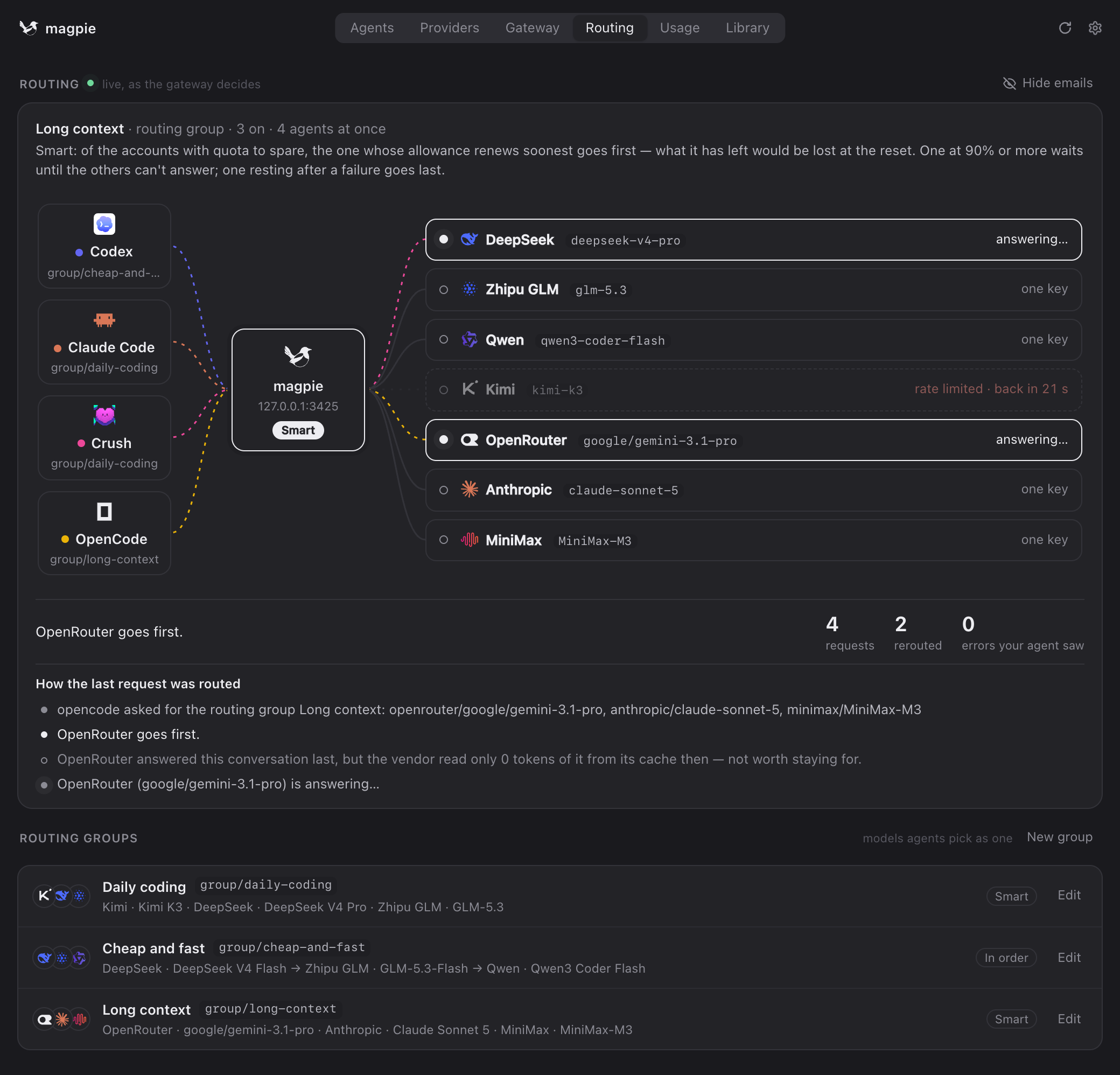
Several accounts or keys in one provider
Open the provider’s row and tick every account or key to use. Routing says how requests spread over them: Smart (the default), In order, Until used up, staying on the next once one is used up even after the first renews, In turn, Least used first, Use before expiry, By weight, each account or key taking its share by the weight set beside it (a Max account 5, a Pro one 1), or Speed first, the key that answered fastest lately first. Fallback lists models to use instead when the provider is out of quota, rate limited or down.
One model over several providers
A group is several models, from one provider or many, that an agent picks as one: group/<id>, under Routing groups in the picker. A model two of your providers serve under the same name becomes a group on its own; New group in the Routing tab makes one of any models you like. The first model answers for what the group can do.
auto/<model> (the model's own id, as in auto/claude-opus-4.6; the older group/auto-… id still works), over every provider that serves it. The name is matched however each vendor spells it (deepseek/deepseek-chat, deepseek-chat). Pick it for an agent to spread its requests over all of them; packinggoods group rm hides one you don’t want.deepseek-v4.1-flash-1017 or grok-4.6@500k. Give it the id you want in the provider's editor, under Names, prices & levels, in Listed as beside Same as, then Save; or run packinggoods model id relay/grok-4.6@500k grok-4.6. packinggoods then lists it, routes it, joins it to the auto/grok-4.6 group with your other providers' grok-4.6, holds gateway keys to it and counts its usage as grok-4.6, and still asks the provider for grok-4.6@500k. One id is one model of a provider: the last one you give it to has it, and the provider's own model of that id is left out of the list while it does. packinggoods model id relay/grok-4.6 --reset takes it back, and packinggoods model ids lists them. It works for a subscription you signed in to and a plugin's provider too (packinggoods model id cursor/deepseek-v41-flash-1017 deepseek-v4.1-flash): the account or the plugin is still asked for its own id.| Routing | What goes first |
|---|---|
Smart smart | The default. Over the members’ accounts and keys together (a group in the group as one, see below): of the subscriptions with quota to spare, the one whose allowance renews soonest. The week decides; an account with five hours and no week (Claude Enterprise) goes by its five hours, so ahead of every week renewing later. Credits with no reset (WorkBuddy’s packages, each ending on its own day) count as renewing when the soonest of those left run out, so the WorkBuddy account whose credits end first goes first; accounts renewing together (free ones at the month’s end) go by whose credits left end first after that. One resting after a failure goes last. |
In order order | The first model until it can’t answer, then the next. |
Until used up drain | One account or key until it is used up, then the next, which keeps the requests: one before it that renews meanwhile doesn’t take them back. One rate limited or failing is passed over only while it rests. |
In turn rotate | Each message you send goes to the next member’s account or key; the agent’s tool calls for it stay on the same one. With Stays on Session, a whole conversation stays on one instead. |
Least used usage | The account or key with the most of its allowance left. |
Use before expiry pace | The account with the most of its week left per hour until it renews — the one with the most to lose at its reset — so less of each member’s week is lost at its reset; an account with five hours and no week (Claude Enterprise) by what its five hours have left per hour until they renew, so almost always first. Credits in an account that expire before it resets count too: those that expire first, per hour until they do, when that is the more (WorkBuddy’s check-in credits). One at 90% or more waits until the others can’t answer. A key by the tokens sent it lately. |
By weight weight | Each model takes its share of the requests by the weight set beside it in the group editor (1 to 1000, 1 if unset): one weighing 3 takes three for every one a model weighing 1 takes, spread out rather than in bursts. Each model is tried whole over its own accounts or keys, as its provider routes them, and a group in the group counts as one. One resting after a failure leaves the round; the next model is the fallback when one fails. |
Speed first fast | The member, account or key that answered this model fastest lately: the time to its first token and how fast it writes, newer answers counting more. Those within a tenth of each other keep their order. One not measured in the last hour gets one request in five, so a channel that was slow once is tried again; one resting after a failure goes last. Only streamed replies are measured, and a restart measures again from scratch. |
Cheapest first cheap | Groups only. The member whose model costs least now, by its price a million tokens in and out at this hour as Usage counts it: your own price for it, else its list price, at the provider’s price rate and rate windows. DeepSeek’s own API, Command Code’s and OpenCode Go’s DeepSeek models cost double in their peak hours (weekdays 01:00–04:00 and 06:00–10:00 UTC), and Ollama Cloud’s DeepSeek V4.1 Flash and V4 Pro in its own (weekdays 12:00–18:00 UTC, half price the rest of the time), so a DeepSeek model listed on two providers goes to the one cheaper at that hour. Members that cost the same keep their order; one with no known price goes last. |
| Stays | How long a conversation stays with the account or key that answered it |
|---|---|
Auto auto | The default. Within a turn always, across turns while what the vendor cached of it is worth keeping. |
Session session | The whole session, while it can answer. With Smart, Least used first or Use before expiry, a new session goes to the account or key the fewest other sessions are on, so sessions side by side each keep one of their own. |
Within a turn turn | While the agent sends tool results back; when you speak again, routing decides afresh. |
Off off | Every request is routed afresh. |
Strict strict | Never moves to another account or key, even past its usage cap: when that one is rate limited or out of quota, the error goes to the agent. New conversations are spread as with Session. |
Rules · a turn to a chosen model
A group’s Rules send a turn to one of its models when the turn is of a kind you name: long (tokens ≥ N), carrying an image, asking for reasoning (on, or at least a level), from certain agents, asking for something you describe (an intent), the agent compacting its context, or working in one of some folders (a project). A rule’s conditions all have to hold, so one can say “in ~/work/acme, and long”. They are looked at top first when you send a message; the first that matches puts its model first, with the group’s others behind it if it fails. A turn no rule matches is routed as the group always routes, and keeps to where it was.
- A rule decides as a turn begins, and the turn stays on that model while the agent sends tool results back, so what the vendor cached isn’t lost halfway. The one exception: a turn that grows past its model’s context moves to a member that takes it.
- Tokens are estimated from the request’s size, or what the vendor counted for the conversation’s last request, whichever is more. Leave some margin: a rule at 150k for a 200k model, not 199k.
- A subagent is a conversation of its own, so a rule can send it elsewhere while its agent keeps where it is.
- An intent is a few words for what the user asks for — “writing or fixing tests”, “a quick question”. As a turn begins, the group’s classifier — any model packinggoods has; a small, fast one without reasoning is best — is asked once which of the intents that could match the user’s message is. Only the message is sent, not the conversation. If it fails, exceeds the configured timeout (15 s by default; set in Settings → Models → Replies → Intent classifier timeout) or can’t say, no intent matches and the turn goes by the other rules. It isn’t asked when a rule without an intent would decide anyway, and the same message isn’t asked about twice. Its calls show in Usage as packinggoods’s own. Exactly what it is asked, how its answer is used and what happens when it fails: Intent routing.
- compacting matches an agent compacting its conversation — Claude Code’s
/compactand auto-compact, Codex, OpenCode, Pi, Gemini CLI, Qwen Code, Kimi Code — so a cheaper, faster model writes the summary while the conversation stays on its own. A compaction is decided on its own: the turn it happens in, and its cache, stay where they were. When the conversation is longer than the rule’s model takes, the next rule that matches, or the group’s order, decides instead. - Hours and days. A rule can hold only at some hours, on some days, by this computer’s clock — a vendor’s peak hours, say. A rule that sends those turns elsewhere still leaves the vendor’s model behind it for failover. To keep a model out entirely, choose Pause the model instead from the rule’s ⋯ menu: while it holds (its hours and days, its agents), that model is left out of the group — never first, never a fallback, not kept for the conversation it was in — and it is back once they end. A pause holds by hours, days and agents only; if every model of the group is paused, the agent is told so.
- Folders. in folder matches a turn from an agent working in one of the folders you list, or a folder inside one:
~/work/acmetakes~/work/acme/web, not~/work/acme-old. The folder is the one the agent tells its model in the request — Claude Code, Codex, OpenCode and Pi say it — so an agent that doesn’t say its folder matches no folder rule.~is your home folder,C:\workis also WSL’s/mnt/c/work, and on macOS and Windows case doesn’t count. - Reasoning. A rule can also set the reasoning its model is asked for, so an intent picks the model and the effort as a pair: Set its reasoning in the rule’s ⋯ menu, or
use-effort=lowfrom a terminal. The model is asked for it whatever the agent asked, at the model’s nearest level; a model whose levels packinggoods doesn’t know, and the models behind it for failover, are asked as the agent asked. See Intent routing. - The Routing tab says which rule sent each turn where, what the classifier said, and the folder the agent said it was in.
Groups in groups
A group’s models can include another group: pick it under Routing groups in Add a model, or models+=group/<id> from a terminal. The group in it takes its place in the order and routes among its own models by its own routing and rules. So Coder can be deepseek-v4-pro then Fast, and Fast its own order of cheap models. A Coder rule can send a turn to group/fast, and Fast’s own rules then pick which of its models goes first.
- No loops. A group can’t be in itself, directly or through the groups in it. Saving Fast with Coder in it, while Coder has Fast, is refused, and the picker doesn’t offer such a group. Groups go at most 8 deep. A group can’t be removed while another has it: take it out there first.
- Each group routes by its own routing. Whatever the outer group’s routing, it never reaches inside a group in it: Smart, In turn, Least used or Use before expiry weighs the inner group as one member, by the account or key the inner group would try first, and where it lands the inner group is tried whole, in its own order. Coder on Smart with Claude (In order) and GPT (In order) in it compares Claude’s first with GPT’s first, not all of their accounts together.
- So does a provider routed its own way. A model whose provider routes its accounts or keys In order, In turn, by Least used, Use before expiry or Weight keeps that inside any group, weighed as one by the account or key it would try first and tried whole in its own order. One left on Smart, the default, has its accounts weighed with the group’s others as one pool, so the one whose allowance renews soonest goes first whichever provider it is of.
- Failover goes through. If every model in the inner group fails, the outer group’s next member answers, as with any member.
- A model that appears twice (on its own and in a group in it) is asked once, at its first place.
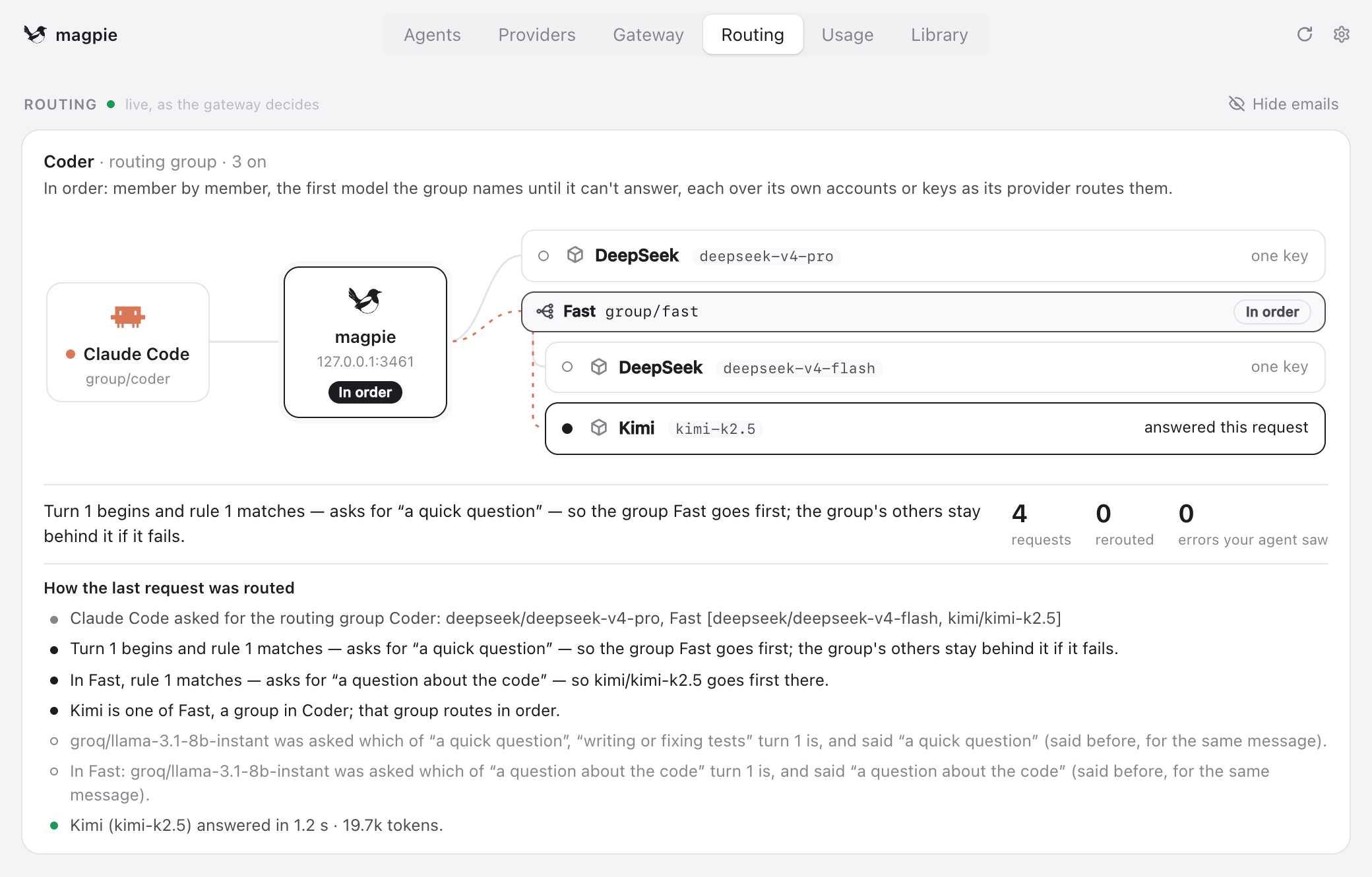
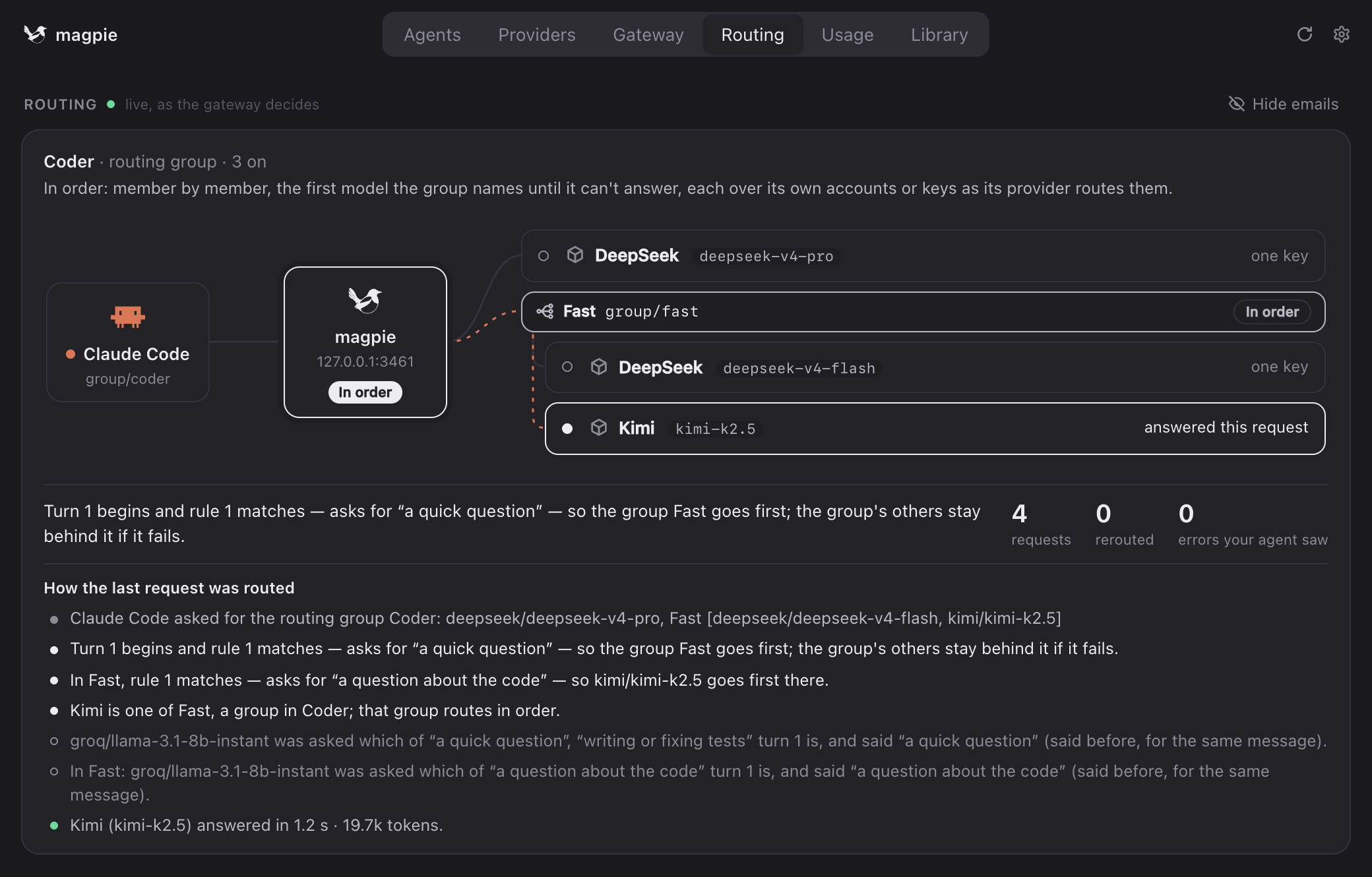
The Routing tab shows the gateway’s decisions live: who answered each request, and why. The same groups from a terminal:
packinggoods groups                        # yours, then those packinggoods found
packinggoods group add "Opus anywhere" models=claude/claude-opus-5-5,copilot/claude-opus-5.5 routing=order stays=session
packinggoods group set opus-anywhere models+=openrouter/anthropic/claude-opus-5.5
packinggoods group set opus-anywhere routing=weight weight=claude/claude-opus-5-5=3  # three of every four requests to it
packinggoods group rule add opus-anywhere use=openrouter/anthropic/claude-opus-5.5 tokens=150k  # long turns to it first
packinggoods group rule add opus-anywhere use=copilot/claude-opus-5.5 intent="a quick question" classifier=groq/llama-3.1-8b-instant
packinggoods group rule add opus-anywhere use=deepseek/deepseek-v4-flash compact  # /compact summaries to a cheap model
packinggoods group rule add opus-anywhere use=kimi/kimi-k2.6 folders=~/oss,"~/My Project"  # turns in those projects to it first
packinggoods group rule add opus-anywhere pause=copilot/claude-opus-5.5 time=14:00-18:00 days=mon-fri  # left out in those hours
packinggoods group rule add opus-anywhere pause=claude/claude-opus-5-5 except-folders=~/big-task  # the model kept for the task in ~/big-task: left out of every other folder
packinggoods group rule add opus-anywhere use=deepseek/deepseek-v4-flash when="effort is off" when="not subagent"  # reasoning off, not a subagent
packinggoods group rule add opus-anywhere use=deepseek/deepseek-v4-flash when="system matches ^你是对话标题命名"  # a harness's title call, told by its system prompt
packinggoods group set coder models+=group/opus-anywhere  # a group in a group
packinggoods group rule opus-anywhere      # its rules; rule rm|mv <n>, rule classifier <group> <model>
packinggoods group copy opus-anywhere "Opus test"  # the same models, routing and rules, to change on its own
packinggoods group rm opus-anywhere        # one packinggoods found is hidden; packinggoods group restore <id>
packinggoods claude group/opus-anywhere    # use it
Usage and profiles
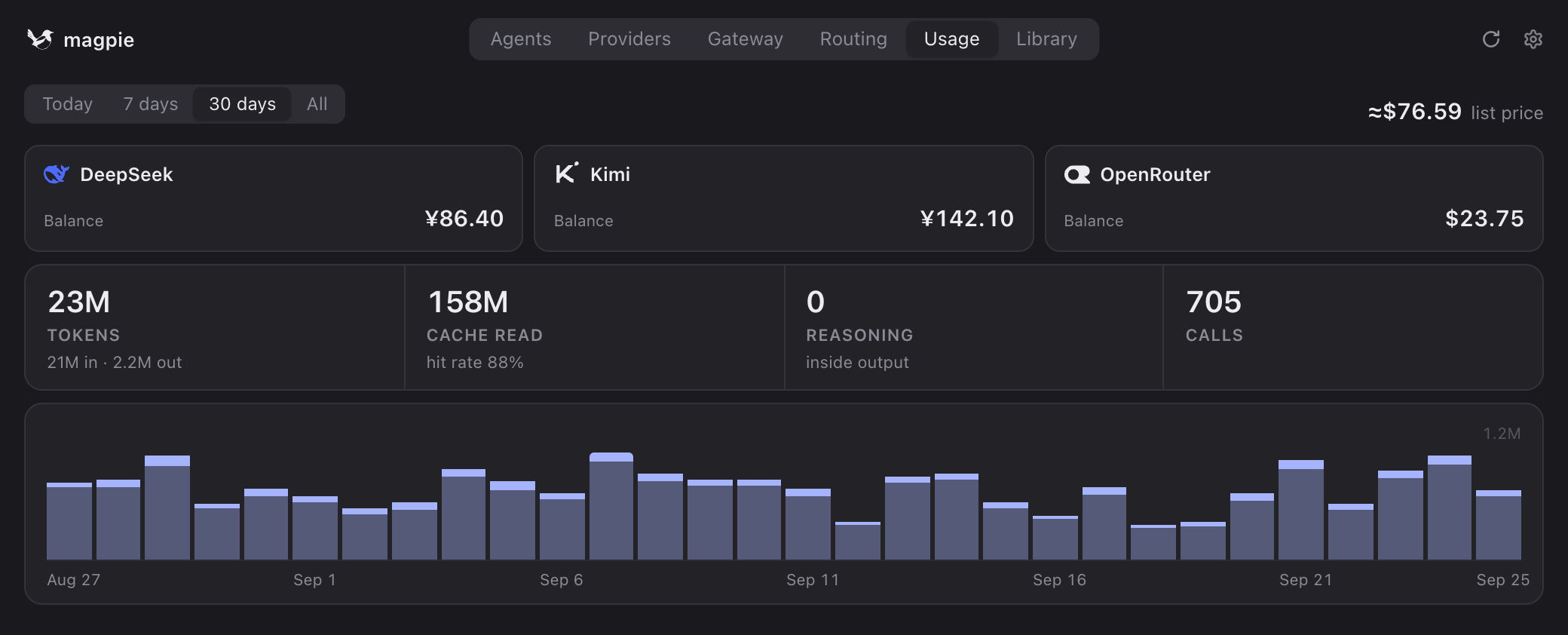
Usage. The Usage tab counts tokens, cache hits and cost for each agent and model, from every call through the gateway, for Today, 7 days, 30 days or All; your subscriptions’ allowance used, and when it resets, sits on top. Calls an agent makes to its own vendor directly don’t pass through packinggoods and aren’t counted.
Context. Usage’s Context tab shows what each agent’s prompts hold, read as they pass through the gateway: its system prompt, tool definitions (an MCP server’s as one), instruction files and skills, the files its tools read, their other output and the conversation, as parts of the model’s context window. Each agent gets a score out of 100 — how much of its prompt the cache reads, how lean it starts, how fast it fills and how often it fails — and tags such as Lean start or MCP-heavy that say what the score was told by. Open a session to see its latest request’s window, cell by cell; the Routing page shows the same for any request you pick. Click a part, a cell or an item to read its text as packinggoods sent it, masked where masking is on. That text is kept for the last 10 requests only, in memory while packinggoods runs; what is saved keeps names only, never your prompt’s text, and nothing of it is sent anywhere.
Profiles. At the bottom of the Agents tab, + Save current snapshots every agent’s settings under a name; click the chip to switch everything back in one move. The profile in use is ticked, and the tray panel’s Profiles button shows its name; a setting changed by hand since clears the tick.
From the terminal
packinggoods tui is the whole app in a terminal, and every step above has a command. packinggoods help lists them all.
| Command | Does |
|---|---|
packinggoods ls | Every agent found and its settings |
packinggoods presets | The vendors packinggoods knows |
packinggoods provider add deepseek sk-… | Add a preset with its key |
packinggoods accounts add codex | Sign in to one more Claude or ChatGPT subscription |
packinggoods accounts switch claude next | Sign Claude Code (or codex) in to the next of your accounts that has room, or the one with the most left when none has |
packinggoods accounts discovery off | Never read your agents’ sign-ins (Claude Code’s and Codex’s files, the Keychain); on reads them again |
packinggoods providers | Your providers: host, key, models, who uses them |
packinggoods models | Every model agents can pick, as provider/model |
packinggoods claude codex/gpt-5.5 | Set an agent’s model |
claude-packinggoods | Claude Code through packinggoods for one session, a plain claude left on your account (packinggoods claude run; packinggoods claude launcher add puts it on PATH) |
packinggoods codex effort high | Set another field |
packinggoods codex default | Back to the agent’s own default, packinggoods’s wiring removed |
packinggoods save work · use work | Save and apply a profile |
packinggoods usage 7d | Tokens and cost per agent and model |
packinggoods tools · packinggoods tool generate_image "…" -o hero.png | The tools packinggoods gives agents over MCP (image generation, image recognition, web search, plugins’), listed and called directly; an image it makes is saved |
packinggoods tray | Start with the menu bar icon only |
packinggoods log · packinggoods log -f | Where packinggoods’s logs are, to send with a report; -n 200 prints the app log’s last lines, -f follows it |
Keep packinggoods in sync across computers: WebDAV, S3 and GitHub
FAQ
Do I need to export OPENAI_BASE_URL or ANTHROPIC_BASE_URL?
No. For the agents packinggoods lists, it writes the gateway’s address and token into the agent’s own config file. Those variables are only for other tools with a base-URL setting: the Gateway tab’s Connect section has them as copy buttons and snippets.
Does packinggoods have to be running?
For a model through packinggoods, yes: the gateway runs with the app. Closing the window leaves it running in the menu bar or tray; packinggoods tray starts the icon alone (put it in your login items), and packinggoods serve runs just the gateway, and packinggoods daemon install keeps it running as a service (systemd on Linux, launchd on the Mac), from login or boot, with no window; packinggoods daemon install --web has it serve the browser page too, and packinggoods daemon status prints the page’s link. An agent on its own model and its own sign-in doesn’t go through packinggoods.
How do I put an agent back the way it was?
Pick one of the agent’s own models in the picker, or run packinggoods <agent> default. packinggoods removes what it wrote and restores the values it replaced, such as an ANTHROPIC_BASE_URL you had before.
I switched models, but my agent still uses the old one.
A running session keeps what it started with. Start a new one; for Codex, restart the Codex app too.
Does editing the agent’s config by hand break anything?
No. packinggoods reads the files each time and touches only the keys it sets, so your other settings and comments stay. Providers brought over with Import… are copies: later changes in the agent’s settings aren’t copied again.
Installing or updating behind a firewall, or without access to GitHub?
Give the installer and packinggoods update a proxy: curl -fsSL https://packinggoods.com/install.sh | sh -s -- --proxy http://127.0.0.1:7890, or packinggoods update --proxy socks5://127.0.0.1:1080 (http, https, socks5 and socks5h; HTTPS_PROXY and ALL_PROXY are honoured too). Release files come from packinggoods.com (Cloudflare R2), and from github.com when that fails. --mirror <prefix> fetches the release file from a GitHub download mirror you choose, as <prefix>https://github.com/…, when the site’s copy fails; packinggoods update mirror <prefix> keeps it for every update, the app’s too, and packinggoods update mirror off removes it. No mirror is used unless you give one, and the file’s SHA-256 still comes from packinggoods.com, never from the mirror: a file the mirror changed is refused. The app’s own updates go through Settings → Proxy.
How do I check that a download was built by GitHub Actions?
Every file on chanccer/packinggoods-releases carries a SLSA build provenance attestation, signed through Sigstore with the GitHub Actions run’s own identity and no key of ours. With the GitHub CLI: gh attestation verify packinggoods-darwin-arm64.zip -R chanccer/packinggoods-releases. It shows the workflow and run that built the file, and fails for a file that run didn’t produce. The same command works on the copy in chanccer/packinggoods’s Releases. From v0.1.3891 on. The attestation names the packinggoods-releases repo and its commit, not the source commit in chanccer/packinggoods. The app’s own updates check both: the release’s SHA-256 list carries an ed25519 signature, checked against a key built into packinggoods (offline, and also for a file from packinggoods.com’s mirror), and from v0.1.3891 on the app also checks the file’s attestation and refuses a file that has none or whose attestation is not from this repo’s release workflow. A file downloaded from packinggoods.com has its attestation taken from packinggoods.com too (the attestations.jsonl below), and from GitHub when the mirror doesn’t have it; wherever it comes from, it is checked the same way, against Sigstore’s root built into packinggoods, so the mirror only carries it. When it can’t be had, the update goes on on the signature alone and the log says so. The same attestations are kept on packinggoods.com, beside the mirrored files, so they are there when GitHub is not: https://packinggoods.com/files/v<version>/attestations.jsonl holds one bundle per line for every file of the release. Download it with the file and check offline of the attestation API: gh attestation verify packinggoods-darwin-arm64.zip -R chanccer/packinggoods-releases --bundle attestations.jsonl (the bundles are Sigstore bundles; a release that is not among the newest on the mirror falls back to the command above).
Which build does the installer put on Linux?
The desktop app (window, tray icon and a menu entry) when GTK 3 and WebKitGTK 4.1 are installed. On a computer with a desktop but without them, the installer installs WebKitGTK 4.1 with your package manager (apt, dnf, pacman or zypper), through sudo, which asks for your password, and then the app; it says what it installs before it asks. Run without a terminal (CI, a Dockerfile), without sudo, on another distribution or when that install fails, it installs the terminal build (packinggoods tui, packinggoods web and the CLI) and ends with the command that installs them, such as sudo apt install libwebkit2gtk-4.1-0 on Debian and Ubuntu or sudo dnf install webkit2gtk4.1 on Fedora; run the installer again afterwards for the app. A desktop counts whether you run it there or over ssh: a graphical session, your graphical login, or a desktop installed to log in to. A server without one gets the terminal build. To choose yourself, add --gui (the app even when its libraries can't be installed now) or --tui (the terminal build, and no package installed): curl -fsSL https://packinggoods.com/install.sh | sh -s -- --tui.
How do I uninstall packinggoods?
Installed with the script: curl -fsSL https://packinggoods.com/install.sh | sh -s -- --uninstall has packinggoods disconnect every agent and put back what each had first, then takes off what the script put there: the packinggoods command, and the app on macOS or its menu entry, icon and packinggoods:// handler on Linux, with packinggoods’s service and opening at login there, which would start a packinggoods that is gone. Your settings, providers and usage in ~/.config/packinggoods stay, for when you install again. Add --purge to delete them too (packinggoods uninstall --yes). Installed another way, packinggoods uninstall or Settings → Uninstall packinggoods does what --purge does and leaves the program itself for you to delete.
Deleted packinggoods already (the app in the Trash, the folder removed) and an agent still says it can’t connect? On macOS and Linux run the same --uninstall line: with no packinggoods left it downloads the newest to a temporary folder, checked like an install, and that one puts your agents back while packinggoods’s record of what each had is still in ~/.config/packinggoods. On Windows, download packinggoods again and use Settings → Uninstall packinggoods. To put Codex back by hand, quit it, then in ~/.codex/config.toml delete each line under a # packinggoods: comment (openai_base_url, model_provider = "pkgood", model_catalog_json) and set model to one of Codex’s own; the [model_providers.pkgood] table can go too once no thread you keep was started on packinggoods. Delete ~/.codex/packinggoods-models.json, and open Codex again.
Can packinggoods keep its files on another disk, so reinstalling the system doesn’t lose them?
Installed, packinggoods keeps its settings, providers, usage and library in ~/.config/packinggoods (C:\Users\<you>\.config\packinggoods on Windows). It backs them up by itself once a day, into auto-backups in that same folder, so a reinstalled system loses the backups too; Settings → Sync and backup says so under Backup folder. Click Change… there and pick a folder on another disk (D:\packinggoods-backups) or one a cloud drive syncs. After a reinstall, install packinggoods, pick the same folder there and Restore… the newest version. Backups hold no API keys; Sign-ins in backups adds subscription accounts and plugin sign-ins, sealed with a passphrase. To carry the keys too, sync to a WebDAV folder, an S3 bucket or a GitHub repository, sealed with a passphrase, in the same place.
To keep packinggoods’s own files on that disk (an external SSD, say), click Move… beside Data folder in the same place and pick a folder there. packinggoods restarts, moves its files and cache into a folder named packinggoods inside it, and leaves a link where they were, so nothing else changes. Keep the disk connected: without it packinggoods won’t open until it is back. Move back brings them home. packinggoods data move <folder> does the same from a terminal.
To keep everything on that disk, run packinggoods portable: put packinggoods.exe in a folder there with an empty folder named data beside it (D:\packinggoods\packinggoods.exe and D:\packinggoods\data). packinggoods then keeps everything in data, its caches and log too, and writes nothing of its own to your user folder; Settings → About → Config folder says Portable. Open it, and restore a backup into it as above. After a reinstall, open D:\packinggoods\packinggoods.exe again. The agents’ own configs (~/.claude, ~/.codex…) stay where each agent reads them.
Where is packinggoods’s log?
The app (its window, the menu bar or tray icon and the panel, however it was opened) writes app.log: ~/Library/Logs/packinggoods/app.log on macOS, %LOCALAPPDATA%\packinggoods\logs\app.log on Windows, ~/.local/state/packinggoods/app.log on Linux ($XDG_STATE_HOME/packinggoods when that is set), and logs in a portable packinggoods’s data folder. Settings → About → Log has its path and an Open that shows its folder; packinggoods log prints it, and packinggoods log -f follows it. At 5 MiB it becomes app.old.log beside it, so two files at most are kept. It holds what packinggoods did and the errors it met (a provider refusing a request, a retry, a plugin that failed to start), not your keys, prompts or replies; what looks like a key or token is masked anyway. packinggoods serve run as a service logs elsewhere: ~/Library/Logs/packinggoods/serve.log on macOS, journalctl --user -u packinggoods on Linux; packinggoods log names it too.
What does packinggoods send about me?
Your prompts, replies, keys and accounts go only to the providers you use; packinggoods has no server of its own in the path. Once a day a released packinggoods tells us it is in use, so we know how many people use it and what to look after first: a random id made up on your computer, packinggoods’s version and your system, and which agents, providers and models it is used with, by packinggoods’s own ids (claude, deepseek, deepseek/deepseek-v4) with how many of each. A provider you added yourself, and a model on it, is only custom. For each partner listed first in the add sheet, how many times a day it was shown, opened and added from goes with them, as counts only. No names, base URLs, accounts, keys, prompts or usage are sent. Settings → Privacy → Share the agents, providers, models and plugins I use leaves out the agents, providers and models, the partner counts and which of Discover’s plugins are installed (for its counts of who uses and likes each); Count me as a user, DO_NOT_TRACK=1 or PACKINGGOODS_NO_STATS=1 turns it all off. Builds from source never send it. A partner's website and key-page links go through packinggoods.com/go/…, which counts the click (the partner, which link, and a country) before sending you on, and packinggoods.com counts how many times the partner list is fetched. The server sees these whatever the settings say, as any website sees its visits; no id, address or account is kept with them. Icons named by a plugin, an import link or the library are fetched through packinggoods.com/api/icon, so their hosts see Cloudflare's address, not yours; the server only passes the picture on, and counts and keeps nothing. The Privacy page lists everything packinggoods sends by itself, with an example of the daily count, the files it keeps and every switch.
The agent gets 502 or can’t connect, and nothing shows in packinggoods’s Routing tab?
A proxy app (Surge, Clash, mihomo and the like, with system proxy, TUN or enhanced mode on) has taken the agent’s request to http://127.0.0.1:3425 and sent it somewhere else, so it never reaches packinggoods. The bypass list (skip-proxy, “bypass”) isn’t always enough: some agents, Codex among them, send it through the proxy anyway. Add rules that send the local addresses direct, ahead of your other rules:
IP-CIDR,127.0.0.0/8,DIRECT,no-resolve
IP-CIDR6,::1/128,DIRECT,no-resolve
In a Clash or mihomo config the same lines go under rules:, each starting with - . Then send the agent a new request.
Can DeepSeek Harness keep its own DeepSeek row and go through packinggoods?
Yes, by hand. Connecting dsh adds packinggoods’s routes and leaves dsh’s DeepSeek row (llm-deepseek) to dsh. That row keeps DeepSeek’s cache when dsh’s prompt or tools change mid-session. To send it through packinggoods, add this to ~/.dsh/profiles/<profile>/cordis.patch.yml:
- id: llm-deepseek
  config:
    baseURL: http://127.0.0.1:3425
    apiKeyEnv: PACKINGGOODS_DS_KEY
    maxInlineRequestImageBytes: 67108864
    models:
      - id: deepseek/deepseek-flash
        name: DeepSeek V4.1 Flash (packinggoods)
        contextWindow: 1000000
        inputModalities: [text, image]
        systemPromptUpdate: in-history
        toolUpdate: addition-only
      - id: deepseek/deepseek-v4-pro
        name: DeepSeek V4 Pro (packinggoods)
        contextWindow: 1000000
baseURL has no /anthropic. The model ids are packinggoods’s (packinggoods models), and a models list replaces dsh’s defaults, so keep the two update lines. PACKINGGOODS_DS_KEY holds the gateway key (packinggoods on this computer), not your DeepSeek key: export it, put it in ~/.dsh/.env, or enter it on the DeepSeek row in dsh’s Models page. Pick the model in dsh; Disconnect leaves the entry alone. packinggoods has no Files API, so dsh sends images inline as base64 each turn, up to maxInlineRequestImageBytes (20 MiB by default, 64 MiB above). Keep the row on DeepSeek’s own models. More in the reference.
Can Trae or Trae CN use packinggoods’s models?
Users report that this works. Trae keeps custom models in your Trae account, on its servers, so packinggoods can’t set it up for you, and Trae may not reach 127.0.0.1. So:
- In packinggoods, turn on Settings → Network and sharing → Share on local network, and note the Address it shows.
- Take a gateway key (Gateway → Gateway keys, or
packinggoods gateway-key add "Trae"). - In Trae’s custom model settings, enter that address as the address and the gateway key as the API key.
The model id is packinggoods’s (packinggoods models). Sharing lets other computers on your network in with a gateway key; see Remote packinggoods.
An error from the gateway? See Fixing common errors. Stuck, or have a setup worth sharing? Ask on Discord. Chatting in Cherry Studio? See Every model in Cherry Studio. Vendors who want to hand their users a ready-made provider: see Add to packinggoods.